
TapFeed
Tapo App for PC, previously named Tapo-Viewer
Free Tapo desktop app for Windows 11 and 10 to watch live HD streams, turn pan and tilt cameras, and save microSD recordings to your PC.
Free and open source under the MIT License for Windows 10 and 11. Updated .
62 MB
Single portable TapFeed.exe download, down from 264 MB in Tapo-Viewer 1.x.
3 s
Typical startup time on Windows 10 and 11, down from 24 to 47 seconds, with zero 610 MB temp unpack.
27+
Verified mains-powered TP-Link Tapo indoor, outdoor bullet, and 360° pan and tilt cameras.
Does TP-Link Tapo have a desktop app for PC?
TP-Link does not release an official Tapo app for PC or a built-in Tapo web viewer for Windows 11 and Windows 10. TapFeed (previously named Tapo-Viewer) is a free, open-source Tapo camera PC app built with Rust, Tauri 2, embedded libmpv video playback, and PyTapo (v3.4.31). It streams live HD or SD video with sound and screenshots, lists recordings on the camera's microSD card by day, downloads clips as .ts files to your computer, and turns motorized pan and tilt cameras over your home network with no Tapo Care subscription or Android emulator.
On first start, TapFeed automatically copies your existing Tapo-Viewer settings, saved passwords from Windows Credential Manager, and language files, keeping your downloaded recordings where they are. Versions up to 1.1.3 are named Tapo-Viewer.exe; v2.0 and newer ship as TapFeed.exe.
Sign in once, test your IP, and queue downloads
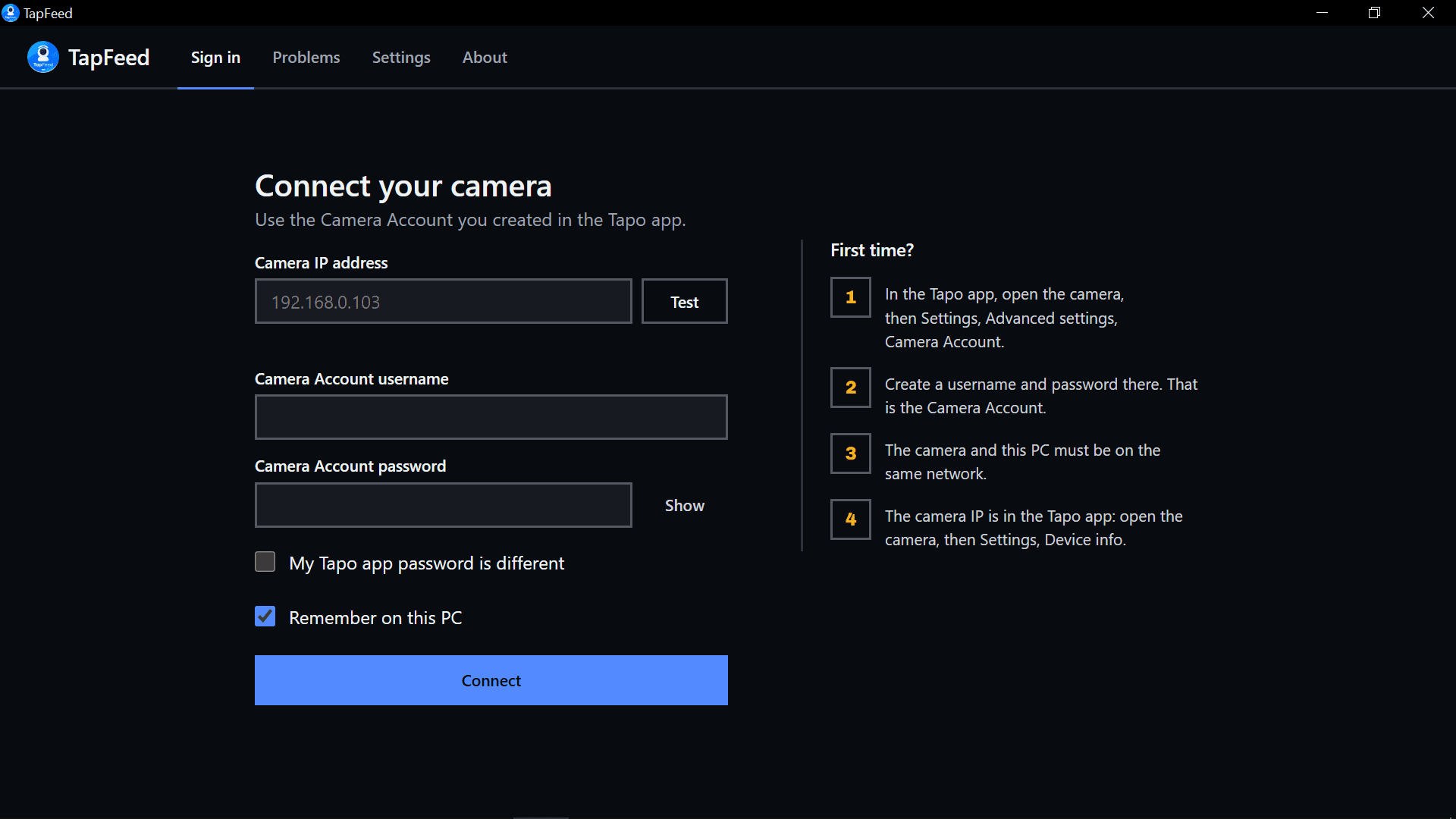
Double-click TapFeed.exe with nothing to install. Every screen is built for local network speed and plain-language feedback.
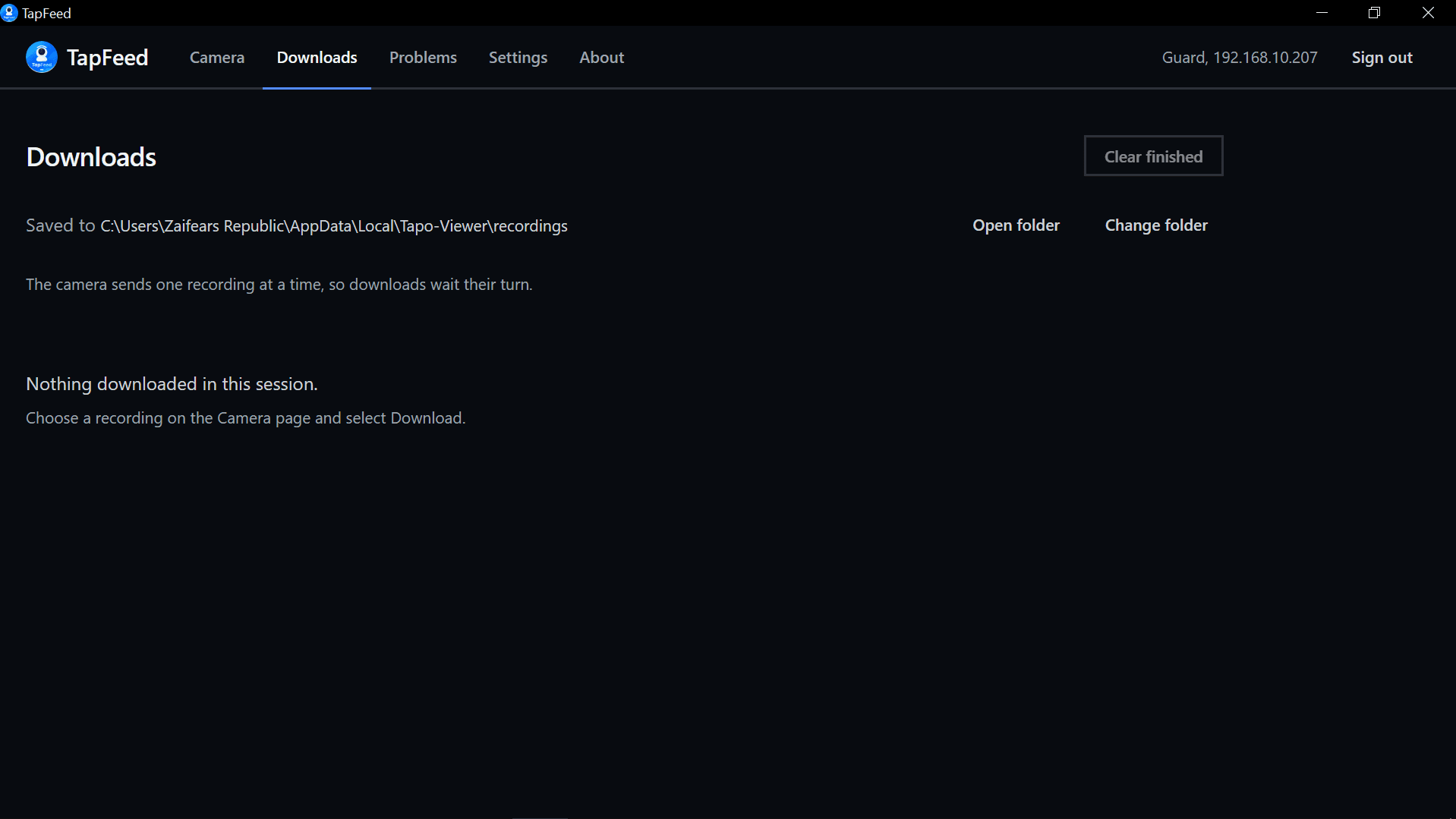
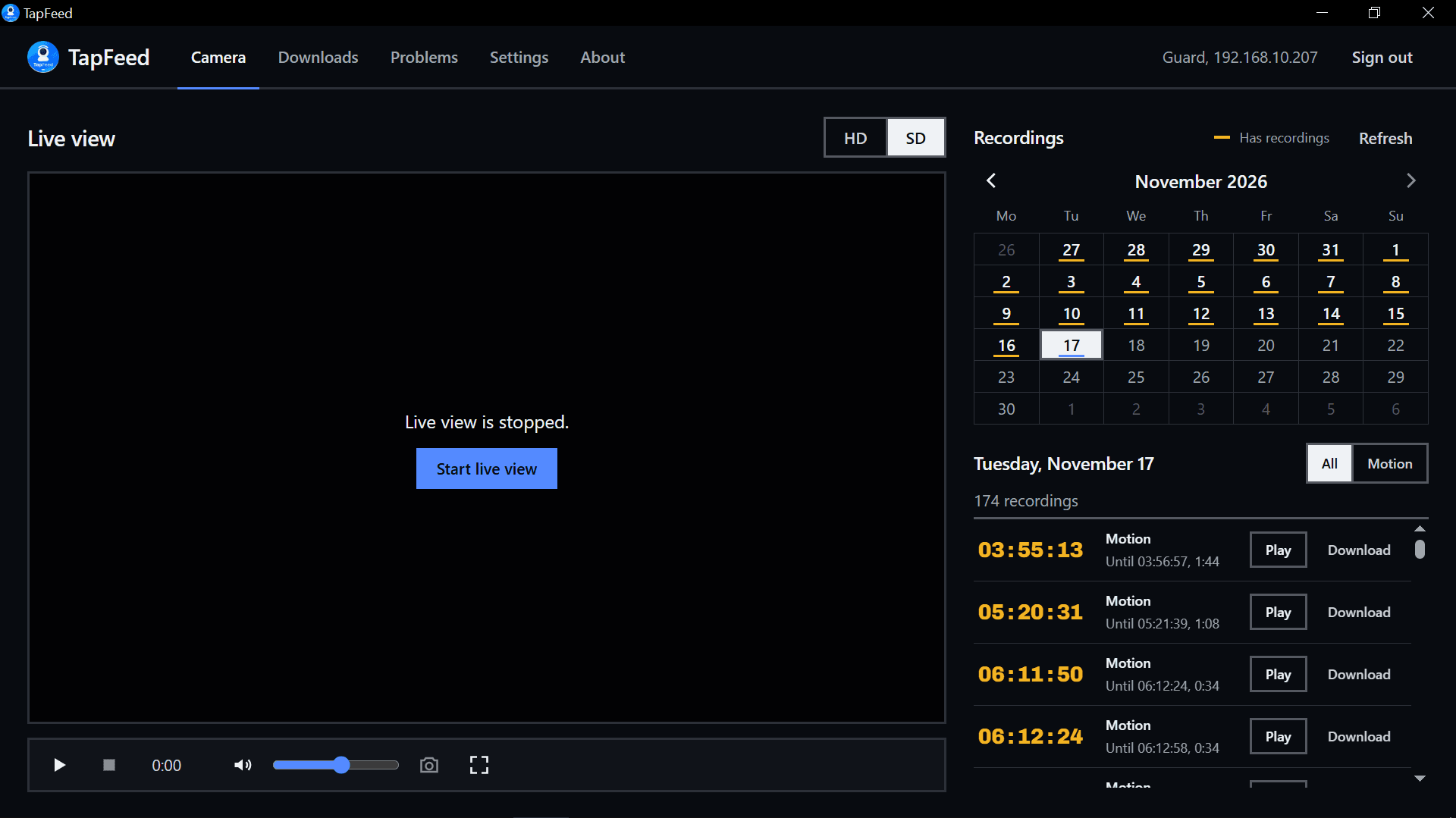
.ts recordings queue one at a time with live percentage progress, cancel, play, and show in folder controls.What TapFeed does on your PC
Every control talks directly to your camera over local Wi-Fi or Ethernet, without routing video through third-party servers.
- Live view in HD or SD
- Watch live camera video in HD or SD with sound, full screen, and one-click screenshots powered by embedded mpv, or open the stream in an external player.
- Motorized pan and tilt
- Directional arrow buttons and saved preset positions appear automatically when connected to a Tapo camera with a pan and tilt motor.
- SD card calendar
- Days with microSD card recordings are marked on a monthly calendar. Pick any date to inspect and filter motion or continuous clips.
- Direct .ts downloads
- Clips are saved directly as loss-free .ts video one at a time with live progress, cancel, in-app playback, and folder reveal controls.
- Plain-language problems
- Every connection or playback error states what happened in plain words and lists step-by-step fixes to try.
- Windows Credential Manager
- Camera Account and Tapo app passwords stay inside Windows Credential Manager, and only when you explicitly tick Remember on this PC.
- Update notice
- A small startup prompt lets you know when a new version is out on GitHub (sending zero camera details), and you can turn it off in Settings.
- Your language in one JSON file
- All interface text comes from a single JSON file per language. Drop a translated file into the language folder and restart with no coding needed.
Before you connect: two Tapo logins
Tapo cameras use two separate credentials. TapFeed may need both depending on your camera model and firmware.
| Credential | What it is | Where to find it | Used for |
|---|---|---|---|
| Camera Account | A local username and password created inside the camera's settings | Tapo app, camera, Settings, Advanced settings, Camera Account | Live video (RTSP stream) |
| Tapo app password | The password you use to sign in to the Tapo mobile app | Your TP-Link ID account | Listing and downloading SD card recordings on some cameras |
The camera's IP address is in the Tapo app under Device info. Use Test beside the IP field to check it before signing in. Battery cameras usually have no live video (RTSP) support; see TP-Link's official RTSP compatibility list.
How TapFeed compares on Windows
Watch live feeds and archive microSD clips without heavy Android emulators, cloud subscriptions, or climbing a ladder to pull the memory card.
| Method | PC live view and PTZ | SD card downloads | Cost | Footprint |
|---|---|---|---|---|
| TapFeed 2.0 (Windows) | Built-in HD and SD mpv with pan and tilt | Direct .ts over Wi-Fi, no card pull | Free and open source (MIT) | 62 MB download, opens in ~3 s |
| Tapo-Viewer 1.x (Legacy) | External player or Tkinter window | Over Wi-Fi | Free and open source (MIT) | 264 MB download, 24 to 47 s start |
| Official Tapo mobile app | Phone or tablet screen only | Manual clip saves to phone | Free or Tapo Care ($3.49/mo) | Drains phone battery |
| Android emulator (BlueStacks) | Emulated mobile window | Shared emulator folders | Free with ads | 2 to 4 GB RAM, high CPU load |
| Pulling SD card manually | No live video feed | Physical card reader required | Card reader hardware | Must dismount camera |
Supported TP-Link Tapo cameras
TapFeed connects to any mains-powered TP-Link Tapo camera with a local Camera Account and RTSP live video. Pan and tilt controls appear automatically on models with a motor, such as the C200, C210, C225, and C500.
Indoor pan and tilt (360°)
Motorized pan and tilt rotation, saved positions, and local RTSP live view
- Tapo C200 (1080p FHD)
- Tapo C210 (2K 3MP)
- Tapo C211 (2K 3MP)
- Tapo C212 (2K 3MP)
- Tapo C220 (2K 4MP QHD)
- Tapo C225 (2K Starlight)
- Tapo TC70 (1080p FHD)
- Tapo TC71 (2K 3MP)
- Tapo TC72 (2K QHD)
- Tapo TC73 (2K QHD)
Indoor fixed and compact
Compact wall-mount, desktop, and magnetic base cameras
- Tapo C100 (1080p FHD)
- Tapo C110 (2K 3MP)
- Tapo C111 (2K 3MP)
- Tapo C120 (2K QHD IP66)
- Tapo C125 (2K QHD AI)
- Tapo TC60 (1080p Fixed)
Outdoor bullet and ColorPro
Weatherproof IP66 bullet cameras with color and starlight night vision
- Tapo C310 (2K 3MP)
- Tapo C320WS (2K 4MP Color)
- Tapo C325WB (2K ColorPro)
- Tapo TC65 (3MP Outdoor)
Outdoor pan and tilt PTZ (360°)
Weatherproof 360° panoramic outdoor cameras with motorized pan and tilt controls
- Tapo C500 (1080p IP65)
- Tapo C510W (2K 3MP Color)
- Tapo C520WS (2K 4MP Starlight)
- Tapo TC40 (1080p PTZ)
- Tapo TC41 (2K PTZ)
Floodlight and cellular
Smart floodlight security and LTE cellular outdoor models
- Tapo C720 (2K Floodlight)
- Tapo C501GW (4G LTE PTZ)
Build from source on Windows
Needs Rust (MSVC), Visual Studio 2022 C++ Build Tools, Python 3.10+ with pip install -r requirements.txt pyinstaller, and a 64-bit libmpv-2.dll in vendor/libmpv/.
git clone https://github.com/zaifears/TapFeed.git
cd TapFeed
build_desktop.bat
Output: dist\TapFeed.exe. To update PyTapo, run .venv\Scripts\pip install -U pytapo, then run build_desktop.bat again.
Translate into your language
New languages are very welcome. Each language is one JSON file, so no coding is needed:
- Copy
desktop/ui/locales/en.jsonto your language code, for examplebn.json. - Translate the text values while keeping the keys and anything in
{braces}. - Add your language entry to
desktop/ui/locales/index.jsonand open a pull request on GitHub.
To try a translation without building, open Settings, Open language folder in the app, copy _template.json to your language code, translate it, and restart.
Tapo PC app questions and answers
Direct answers for Windows 11 and Windows 10 users setting up a TP-Link Tapo desktop viewer.
- Does Tapo have a desktop app for PC and Windows 11?
- TP-Link does not release an official Tapo desktop app for Windows 10 or Windows 11, and there is no built-in Tapo web viewer inside the camera firmware. TapFeed (formerly Tapo-Viewer) fills that gap as a free, open-source Tapo app for PC that streams live HD or SD video, controls motorized pan and tilt cameras, and downloads microSD recordings directly over your local Wi-Fi or Ethernet network.
- How do I download the Tapo camera app for Windows 11 or 10 for free?
- Download the portable TapFeed.exe file (62 MB) from the official GitHub Releases page. TapFeed is completely free under the MIT License, requires no installer or Tapo Care subscription, and starts in about 3 seconds on Windows 10 and Windows 11 (64-bit).
- Is there a Tapo web viewer or PC viewer that downloads microSD card recordings?
- RTSP players like VLC can only show a live video stream and cannot browse or download recordings stored on the camera's microSD card. TapFeed acts as a complete Tapo PC viewer with an interactive monthly calendar that marks every day with saved footage and downloads clips directly to your computer as loss-free .ts video files.
- How do I watch my Tapo camera on PC without an Android emulator like BlueStacks?
- Enable your Camera Account inside the Tapo mobile app (Camera Settings, Advanced Settings, Camera Account), note your camera's local IP address under Device Info, and open TapFeed.exe on your Windows PC. Enter the camera IP, Camera Account username and password, and optional Tapo app password to view live video and control pan and tilt without running an Android emulator.
Credits and support
Camera connection by pytapo from Juraj Nyíri. Video by mpv. Made by Shahoriar Hossain under the MIT License. TapFeed is not affiliated with TP-Link; Tapo is a trademark of TP-Link.